حل مشكلة Generic Host Process for Win32 Services
تظهر رسالة بها

Generic Host Process for Win32 Services
has encountered a problem and needs to close.
We are sorry for the inconvenience.
والصوت لايعمل فى اغلب برامج التشغيل وحركات غريبة تظهر على المتصفح
المشكله تحدث فقط بنسخ الويندوز الغير مرخصه , ويكون سببها نقص بملفات النسخه
أو بمعنى آخر نقص تحديثات أمنيه بالنسخه .
.:: وهناك عدة حلول ::.
Solution 1
Go to the start menu
Right click “My computer”
Click “properties” then the “automatic updates” tab
Choose “turn off automatic updates”
Restart your computer
Go back to start menu and in all programs go to “windows update” you have to be connected to the internet
Manually update windows
Turn your automatic updates back on
You can also try the following solutions to fix this error:
Solution 2
Go to Run and type regedit
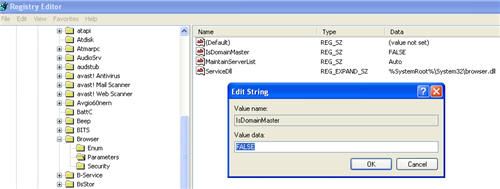
Navigate to HKEY_LOCAL_MACHINE >> SYSTEM >> CurrentControlSet >> Services >> Browser >> Parameters
Find the key IsDomainMaster
Set its value to False
Restart the computer

Solution 3
Go to Run and type cmd
Type ‘netsh’ in command console then press enter
Then type ‘winsock’ and press enter and then type reset
Restart the computer
Solution 4
حمل احد الملفات التاليه وقم بتسطيبها
وعمل Restart للجهاز .
:d6:
.:: أرجو ان يكون الموضوع مفيد ::.
تظهر رسالة بها
Generic Host Process for Win32 Services
has encountered a problem and needs to close.
We are sorry for the inconvenience.
والصوت لايعمل فى اغلب برامج التشغيل وحركات غريبة تظهر على المتصفح
المشكله تحدث فقط بنسخ الويندوز الغير مرخصه , ويكون سببها نقص بملفات النسخه
أو بمعنى آخر نقص تحديثات أمنيه بالنسخه .
.:: وهناك عدة حلول ::.
Solution 1
Go to the start menu
Right click “My computer”
Click “properties” then the “automatic updates” tab
Choose “turn off automatic updates”
Restart your computer
Go back to start menu and in all programs go to “windows update” you have to be connected to the internet
Manually update windows
Turn your automatic updates back on
You can also try the following solutions to fix this error:
Solution 2
Go to Run and type regedit
Navigate to HKEY_LOCAL_MACHINE >> SYSTEM >> CurrentControlSet >> Services >> Browser >> Parameters
Find the key IsDomainMaster
Set its value to False
Restart the computer
Solution 3
Go to Run and type cmd
Type ‘netsh’ in command console then press enter
Then type ‘winsock’ and press enter and then type reset
Restart the computer
Solution 4
حمل احد الملفات التاليه وقم بتسطيبها
وعمل Restart للجهاز .
:d6:
.:: أرجو ان يكون الموضوع مفيد ::.